
Screenshots
About DJ Mixer
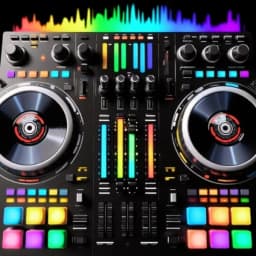
DJ Mixer puts professional music-making tools in your hands. Scratch, mix, and create tracks on your mobile device with a realistic turntable interface designed for both beginners and experienced producers.
Mix two tracks simultaneously and shape your sound with pitch adjustment, tempo control, and cross-fading. The built-in equalizer lets you fine-tune audio quality to match your vision, while smart looping and BPM synchronization keep everything locked in time. Real-time effects and scratch sounds replicate the feel of live DJ performance, so you can create professional-grade mixes without needing a full console setup.
Explore your creativity through dual turntables, high-quality sound samples, and automatic tempo detection. Layer tracks, build mashups, and experiment with different genres—from EDM to Bollywood beats to beatboxing. The intuitive layout means you can start mixing within minutes, but advanced controls are there when you're ready to dive deeper. Use this app to prepare for dance parties, refine your mixing technique, or simply enjoy making music during downtime.
DJ Mixer brings the functionality of professional mixing software to a portable format. Record your own tracks, craft playlists, or challenge yourself to create unique combinations from your existing library. The app adapts to your skill level—casual listeners can jump in immediately, while serious beatmakers will appreciate the precision and depth available in the feature set.
Transform your favorite songs into mashups and discover what's possible when creativity meets accessible technology. Download DJ Mixer today and start building your sound.
Pros & Cons
Pros
- Dual turntables with pitch, tempo, and cross-fading controls for mixing
- Built-in equalizer and real-time effects for shaping your sound
- Automatic BPM synchronization and smart looping keep tracks in time
- Intuitive layout lets beginners start mixing within minutes
Cons
- Requires importing or accessing tracks from your device library
- Professional-grade mixing on mobile has inherent hardware limitations
- No mention of cloud sync or multi-device project portability
- Real-time audio processing may drain battery during extended sessions
Related Apps

Pokémon Ópalo
Pokémon fan game set in Céfira region with new gyms, characters, and Western-inspired aesthetic.

Project64 Legacy
Nintendo 64 emulator for Windows — play classic N64 games on any PC with Project64 Legacy.

ZSNES
Super Nintendo emulator for PC with advanced graphics filters, online multiplayer, and game recording.

Aseprite
Pixel art editor and animation tool for game developers and digital artists. Create and animate sprites with precision.

Parche GTA IV
GTA IV patch: Fix RESC10 crashes, boost graphics, add controller support

M.U.G.E.N
Fighting game engine—create custom fighters without coding. Build your own fighting games.
Latest Articles

Play a free Color Ball Sort Puzzle-style game in your browser (no download)
Oct 6, 2026

Play a free Beach Buggy Racing-style kart racer in your browser (no download)
Oct 6, 2026

Play a free Alto's Adventure-style game in your browser (no download)
Oct 6, 2026

Free online whiteboard like Jamboard: use Quickboard in your browser, no signup
Oct 6, 2026

Free online running pace calculator: splits, race predictor and daily challenge, no download
Oct 6, 2026